| |
| Attempts to use Bluetooth
in a one-to-many connection: Hardware and Software 2008 July 02 |
|
On the PC: Element Direct USB Bluetooth host
dongle P/N 10566. This uses the CSR BC04 chipset which is recommended
for one-to-many connections and for use with Blue Soleil software.
This is a 100 mW output adapter, so its transmit range is great.
Transmit power doesn't solve every problem though unless the other
direction has the same power... The PC in this case is a 1.8 GHz
Pentium IBM/Lenovo T43 with 2 GB RAM, and WinXP Pro with all service
packs and current updates.
FYI: the USB connector is not very securely mounted in the plastic
shell of this adapter. Even slight pressure on the shell makes
the connector look bent. This can't be a good thing. Since the
shell extends some 60mm from its mounting point it should be designed
to take at least some mild abuse.
The Macintosh family of notebooks has used the CSR chipset for
some time. We also tried using a new Mac Powerbook (owned by Shawn
Silverman) and another (owned by my friend Russ), both of whom
are skilled programmers and unix gurus. |
|
Blue Soleil 5.0.5.178 software for the PC. There
is no Mac version so on the Mac we just used what came with OSX. |
|
We chose this adapter because
it has a DB9 output (TrackBot has an optional DB9F/DCE serial adapter),
it can be powered by a USB cable (just for power, not data) and
TrackBot has a USB power-only connector, and it defaults to 19200
baud, TrackBot's host baud rate. So far, so good.
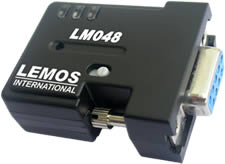
On the TrackBot: Lemos International Bluetooth Serial Adapter,
P/N LM-048, with DB9 female connector. To this we attach a M-M
DB9 gender changer and then set the LM-048 mode switch to DTE mode.
It has a blue link LED, a green data LED and a red power LED. Slide
switch away from the DB9 for DTE mode.
I'm not sure which BT chipset is in the LM048. |
|
TrackBot serial jumpers JP1 and JP2 are installed
and JP[345] are off. (This photo doesn't show the Bluetooth adapter
or SnapTrack mounting for it.)
(If you have sharp eyes you can see that this TrackBot is signed
- by the production crew. This chassis is TrackBot #1 and maybe some
day we'll auction it off on eBay like one of Jay Leno's celebrity
motorcycles...) |
|
TrackBot is a DCE device so we want the LM048
to be configured as a DTE device (white slide switch is away from
the LM048 DB9 connector). Note the red power LED is on and also the
blue Link LED is sold indicating a Bluetooth virtual serial connection.
Also note the USB cable which provides power (not data) to the LM048.
This plugs into the existing TrackBot USB socket. |
photo coming... |
The whole shebang mounted to TrackBot with a
piece of SnapTrack and standoffs. |
|
RealTerm 2.0.0.43 and now there is 2.0.0.57.
Sometimes RT just stops sending a file for no apparent reason. Clicking
"send file" again starts it going. |
| Attempts to use Bluetooth
in a one-to-many connection (PC, WinXP) |
After BlueSoleil software was installed, I
attempted to follow the instructions which used to be online at
Element Direct. Now the page http://www.elementdirect.com/blue.htm
just redirects to http://www.bluesoleil.com/products/index.asp?topic=bluesoleil_v5.
OK, the BS software comes with some documentation, which I did
read.
Click on the taskbar BT icon and select "Start Bluetooth".
The icon turns from gray to - you guessed it - blue. LM048 blue
link LED is blinking 0.3 seconds - discoverable and waiting.
Start BlueSoleil... which seems to have disappeared from my start
menu. It's present in Control Panel Add or Remove Programs... Aha,
it's hiding - and can be reached from the task bar BT icon. I have
two serial adapters Try a search devices. OK it found two.

What are they? I have to select the BT taskbar icon
again and "Explore Bluetooth Places" , double clicking on one of
the serial adapters. It's trial and error to find which one is
the powered up, discoverable device on TrackBot. OK, I do that
and now the BT taskbar icon turns green. And the BS window also
shows the change of state.

Now I am supposed to be able to double click the
remote device (the green question mark above) to discover services.
When I try this, I get " Searching Services is not Successful).
There is a serial connection established on COM29. OK, so fire
up RealTerm on COM29. Oops, lost the BT connection to the remote
node. Can't reconnect. LM048 Blue LED is blinking 0.1 second "pairing".
I can't connect even after powering off the remote node. Turn BT
off on the PC and start all over.
This time start by double clicking My Device (which
we are supposed to intuit is the orange ball in the center of the
BS screen:

Now I can right click the lower remote device and
connect to COM29, and the LM048 blue link LED turns solid blue.
Good.
Now try RealTerm again. What? When Realterm starts
up it scans all ports, including BT virtual ports. This breaks
the connection to COM29 and the LM048 blue link LED starts flashing
again. So add the RealTerm (RT) command parameter "scanports=0"
(this was in a popup message from RT) and see if that helps. But
now I can't connect to that remote BT node no matter what I try:
unpairing, (repair with 1234 as the default key). I can't right
click the Serial Adapter in the BS classic view -- but I can ask
for a serial connection in the taskbar icon Explore Bluetooth Places.
Odd. In any case now the blue LED is solid.
I can now send data (at least the LM048 green data
LED blinks) but there's nothing coming back from TrackBot. Not
sure why... time for the scope?
Another annoyance - closing RealTerm seems to cause
BT to disconnet the remote node. Apparently when BT senses "closure"
of the virtual serial port, it also closes the link from the host.
This is not helpful since I don't know if PC software can easily
re-establish the connection. Currently I have to do this manually
within the BS software.
Later - July 01:
Try this again. I'm starting RealTerm with the scanports=0 option
so that it doesn't try to scan all virtual serial ports. But
on startup RT emits a ProgressBar out of range error and doesn't
open and connect to the specific serial port. Also, with a scope
I can see the data going out of the LM048 to TrackBot and the
response leaving TrackBot but nothing is reported in the RT window.
Also, the serial connection just gets dropped and RT locked up
once. Had to terminate the application in Task Manager.
So I tried using the Systronix Terminal app (a quick
hack I did in Delphi years ago and never really finished, but it
what's there works well) and - shazam - it works and reports the
response from TrackBot. But Terminal doesn't have the ability to
send files like RT does.
So now back to RT but start it normally and tell
it to connect to COM1, then close that port, change the setting
to COMXX (28 or 29 in my case). That works, so something in the
scanports=0 option is causing issues. Now I can send a text file
repeatedly from RT:

and here's the proof that two connections are live
at the same time:

|
| Attempts to use Bluetooth
in a one-to-many connection (Mac, OSX) 2008 April |
Initial attempts to use native OSX software and the Mac Bluetooth radio (which uses the CSR chipset) to make a one-to-many connection with Lemos Int LM048 were significantly less successful than with the PC. We're going to try again, however, before coming to any conclusions. |
| Success: Bluetooth
in a one-to-many connection (Mac, OSX) 2008 Aug 01 |
So my friend Russ brought over his new MacBook Pro and we were able to connect from my desktop with the Element Direct Blutetooth adapter to his Mac. I used RealTerm and he used "screen". We could type data back and forth.
We found some help here on Bluetooth with Mac OSX - thanks to GumStix for posting this:
http://docwiki.gumstix.org/Bluetooth_on_OS_X
The Mac was not able to connect to the LM-048 - the error message is "there were no configurable services found on your device". We assume this means the LM-048 isn't advertising a service in such a way that the Mac can understand it.
We tried again, checking the box to make the BT device "serial adapter" visible in network settings. Then in network settings a dialog opened and showed that a SerialAdapter-DevB-1 and SerialAdapter-DevB-2 had been created but were not connected. We couldn't see how to activate them... we stumbled around the Mac interface and tried to make these a Serial Port not a Modem, and finally were able to connect. But then the Mac caused a disconnect we think because it didn't detect a modem handshake.
We deleted all the BT serial devices and tried to start over. This should be easier...
Aha - so you don't care about the network devices - you just create the serial port and then use "screen" to open a connection to the resulting port name such as "dev/tty.T43-DevB-1" and do not try to "connect" within the Network devices view (which insists on trying to use a modem protocol).
So here is the process:
- Start in the Big Gear icon which is System Preferences.
- Under Hardware click on the Blue Bluetooth icon
- Somewhere here is a screen to specify "use specific passkey", but we can't recall where, and once you select that it seems to remember it as the default for all new BT devices. See the Gumstix page for this...
- In Bluetooth settings click "+" at the bottom of the devices list on the left. This is where you can setup a new device with the BT setup assistant.
- Select DeviceType "any device"
- Then the Mac searches for BT devices of any kind
- Now back at the BT list of devices you can click on the small gear at the bottom, select "edit serial ports", then click "require pairing"
- "Show in Network Preferences" doesn't buy you anything since it has only the view that all BT devices are modems. So we don't use this option. We will use "screen" to open a connection to the BT adapter.
- Select the serial adapter and continue
- Mac gathers information, then when complete press continue
- Enter a Passkey, "1234" for the LM-048
- Now you should be able to use "screen
dev/tty.T43-DevB-1" or whatever the device name you just created.
- If connected to a TrackBot, enter ?CS<cr> to see the serial number or !CA50<cr> to beep the TrackBot alarm for 50 msec on a 250 msec period.
- We tried to connect to a second LM-048 with another screen instance... this works too.
Now we need to run multiple instances of application code on the Mac. |
| Lemos LM-048 as DTE, connected to PC through null modem - findings 2008 July 31 |
| We started out with this connection (LM-048 as DTE) since TrackBot's DB9 serial adapter is wired as DCE. A PC however is DTE, so this requires a null modem. We used a commercial DB9F-DB9F null modem cable. |
| |
|
As a remote device, it easily becomes unresponsive |
Opening and closing Port 25 in RealTerm on the host end must be done with care or the LM048 becomes unresponsive and can't be connected to. The host end won't connect manually in the BS GUI either, reporting "Bluetooth service not available". To make the LM-048 fail this way all you have to do is Open and Close Port 25 on the host end without waiting for the remote end to fully react. It takes a few seconds for the remote end to respond and report CONNECT or DISCONNECT. If you try and hurry it, the only way out is an LM-048 power cycle. Power cycling the host end has no effect.
In this state the LM-048 will respond to AT commands from the remote PC, so it's just the RF portion of it that is hung. |
| Long startup if CD is connected to PC |
The Carrier Detect signal isn't connected according to the LM-048 documentation. But it if is passed through to the PC, it won't ever power up, or takes a very long time. Breaking this signal fixes the problem. |
Java app with RXTX can't make a Bluetooth connection |
The RXTX gnu.io package apparently executes a static initializer when you invoke |
| Some Crude Bluetooth
Benchmarks 2008 July 02 |
Baud rates and boundary conditions |
At 19200 kbaud, it takes 52 usec to exchange
one bit. With start and stop bits, that's 520 usec per byte. So
you'd think a 3-byte command like "?S<cr>" takes 1.5 msec to send,
and it does. But our RT files - since they are created on a PC -
also include a line feed (LF) after the carriage return (CR). TrackBot
ignores the LF, and starts processing the input as soon as it receives
the CR. So there are really four bytes sent from the RT test system
but only three bytes from user application code, and the 4th test
code byte is ignored and doesn't change our timing here.
An 8-byte response takes 4.17 msec to receive.
So just on the TrackBot end a simple 3/8 byte query/response takes
5.7 msec.
It's possible for TrackBot to start processing a new query while
a prior response is still being sent. So the absolute best case
would be responses every 4.17 msec with no gaps. That would have
to be the minimum query repeat interval.
On a scope we observe that the messager-response at TrackBot takes
7 to 11 msec (with a query repeat rate of 1000 msec to be sure
we are not overloading anything). |
Throughput and
Variation
We can't really conside latency here since we don't
have access to a hardware timing point on the PC. So we can't know
the time from a PC serial command to the time it arrives at TrackBot.
All we can study is the variation in the times at which commands
arrive at TrackBot.
|
With one LM048 slave and one
Element Direct master, I set the RT line delay to 0 msec and the
single-query repeat interval to 100 msec. On the scope I see the
queries actually arriving every 80 to 160 msec, approximately.
So sometimes there could be 100 msec, perhaps more, of delay within
the PC and/or BT adapters.
Given that an ideal query/response takes up to 11 msec just at
the TrackBot end, we can't expect to send queries at a rate higher
than that (90 Hz).
If I set the RT repeat interval to 5 msec (clearly not possible)
what I see on the scope is a period of 17 msec where there are
three query/response pairs. Query #2 arrives while response #1
is still being emitted. Then afer the third query, the fourth one
takes 10 msec to arrive. Others have a gap of 50 msec between queries.
This implies a latency of 45 msec.
So we conclude that some combination of PC and BT hardware and
sofware, on this PC, limits the message rate to perhaps 50 msec.
A faster PC would presumably help.
We can test this by setting a message interval X and watching
on a digital scope with infinite persistence. If the gap between
messages fills in, then that interval X is less than the latency
L of the system. Over a sample time of 120 seconds, X=50 msec comes
within 10 msec of filling in.
With two BT channels active, one sending six queries every 100
msec (with 10 msec delay on each command) and the other sending
one query every 100 msec, the scope trace pretty much fills in
over several minutes.
Increasing the interval to 200 msec on both channels improves
the inter-query gap significantly. It maintains about 140 msec
after several minutes. |
Temporal Randomizing |
What we also observe is that some combination
of the PC software, OS, and the BT hardware and drivers wreak a bit
of havoc on nicely formatted and timed messages.
Repeat interval vs observed interval (at TrackBot serial signals),
in milliseconds, one BT channel active:
1000 vs 1000-1250 (250 msec /1000 variation = 25%)
500 vs 450-700 (250 msec variation) <- running Dreamweaver at the
same time
200 vs 190-300 (110 msec variation)
100 vs 85-200 (variation exceeds the interval)
So here we conclude that forces beyond our control change our
attempts to have any reliable timing from a PC brain to TrackBot
when Bluetooth is the radio link. This is with only one BT channel
active. We could expect the effect to worsen as more BT channels
are added. |
Battery Life |
During these tests we ran two TrackBots one afternoon
from about 11:00 to 18:00, powering the LM048 from each TrackBot.
Motors were not running and IR multi-function sensors were not enabled.
Both status LEDs still showed green after more than 7 hours of operation. |
| Some Direct-connection-to-PC
Benchmarks 2008 July 02 |
Baud rates and boundary
conditions |
On the IBM T43 docking station
there is a DB9M so you might assume it's a real hardware UART,
memory mapped like in the good old days. But this UART uses an
internal USB bridge device. It's the same Intel chip family used
in my Dell desktop. So you can't get away from USB these days. |
Temporal Randomizing |
What we also observe is that some combination
of the PC software, OS, and the serial hardware and drivers also
wreak a bit of havoc on nicely formatted and timed messages. Better
then Bluetooth but far from deterministic. These tests were run
while also running other apps. And even if we weren't running other
apps, Windows always seems to have a ton of background processes.
Repeat interval vs observed interval (at TrackBot serial signals),
in milliseconds, one BT channel active:
1000 vs 1020-1420 (400 msec variation) << running Eudora and
Dreamweaver 8 at the same time
500 vs 510-750 (240 msec variation)
200 vs 210-320 (110 msec variation)
100 vs 106-140 (35 msec variation)
Timing with as close to a hardware interface as we can get (in
this case) is still far from ideal. |
| Actual Java Application
Code over Bluetooth Results Running on a T43 PC 2008 July 03 |
Test setup |
IRSensorEval code (at java.net) on an IBMT43
with the Bluetooth hardware above. This queries actual, active sensors
on TrackBot every 100 msec and logs how long each round trip message
takes, as well as any errors or timeouts which exceed a command line
parameter. In this case timeout was 500 msec, so anything taking
longer than that is considered a TO error.
This test run was invoked on the Fore sensors which are seen here
below at each of three gain settings, with 20 samples each. A period
is a ping with no obstacle detected and a * is an obstacle detected.
So the left/port sensor had no obstacle to see and the right/starboard
sensor had a low reflectance test target (rustoleum 7558 flat black)
a few cm away. |
Results
Good news: it works, mostly
Bad news: performance is a bit on the ghastly side. Up to 687 msec
to read a byte of data. Up to 640 msec to ACK a query. 33 Ack
Time Outs (ATO) in 131760 messages.
|
....................    <Port Amb=2 G=1 Stbd>   .............*...*..

            ....................    <Port Amb=2 G=2 Stbd>   ********************

            ......*...*...*.....    <Port Amb=2 G=3 Stbd>   ********************
 0%     0%     15%       <    Min/Med/Max    >       10%     100%     100%

                @6041 sec, test#1098, >131760 msgs, AckMax_cmd/query=203/640 ReadMore=687

                Errors! Acks=45024 Naks=1 ATO=33 RMTO=13 AckMax_cmd/query=203/640 ReadMax=687

                Before/After GC free mem=1870568/1879272, GC took 16 msec
|
| Actual Java Application
Code over Direct Wire Results Running on a Dell Quadcore PC 2008 July 08 |
Test setup |
IRSensorEval code (at java.net) on a Dell quad core 2.8 GHz Xeon PC with RXTX serial drivers and direct wire connection.
Code invoked with batch file and these parameters:
runSensorEval COM1 2 F T 500
This test run was invoked on the Fore sensors which are seen here
below at each of three gain settings, with 20 samples each. A period
is a ping with no obstacle detected and a * is an obstacle detected.
So the left/port sensor had no obstacle to see and the right/starboard
sensor had a low reflectance test target (rustoleum 7558 flat black)
a few cm away. |
Results:
This is fast. Running other apps had no slowing effect.
|
.................... <Port Amb=45 G=1 Stbd> *............**.....
.................... <Port Amb=46 G=2 Stbd> ********************

                .................... <Port Amb=45 G=3 Stbd> ********************

                0% 0% 0% < Min/Med/Max > 15% 100% 100%

                @381 sec, test#201, >24120 msgs, AckMax_cmd/query=16/16 ReadMore=0

                Before/After GC free mem=1877632/1886232, GC took 16 msec
|
| Invalid: Java Application
Code over Bluetooth Running on a Dell Quadcore PC 2008 July 08-09 |
Test setup |
IRSensorEval code (at java.net) on a Dell quad core 2.8 GHz Xeon PC with RXTX serial drivers and Bluetooth. Bluesoleil drivers.
Code invoked with batch file and these parameters:
runSensorEval COM27 2 F T 600 100
Note the new parameter - '100' msec the PC app waits after sending a serial command, before checking if there is a response. More on why this wait was added later...
This test run was invoked on the Fore sensors which are seen here
below at each of three gain settings, with 20 samples each. A period
is a ping with no obstacle detected and a * is an obstacle detected.
So the left/port sensor had no obstacle to see and the right/starboard
sensor had a low reflectance test target (rustoleum 7558 flat black)
a few cm away. |
Results -
invoked with:
runSensorEval COM27 2 F T 600 100
( 100 msec wait after commands)
On a fast PC I had to make the Java app wait 100 msec after sending a command before checking to see if reply data was available. Waiting that long produces reliable results as shown - no NAKs, and very little delay above the 100 msec.
|
.................... <Port Amb=44 G=1 Stbd> ....................
....................    <Port Amb=43 G=2 Stbd>  ***.***.*.****.****.

            ....................    <Port Amb=44 G=3 Stbd>  *..**..***.......**.

            0%   0%   0%        <    Min/Med/Max    >       0%  75%  40%

            @2033 sec, test#354, >42480 msgs, AckMax_cmd/query=110/110 ReadMore=16

            Before/After GC free mem=1877848/1886344, GC took 16 msec
|
Results - running overnight, invoked with:
runSensorEval COM27 2 F T 600 100
Well, things are not quite so pretty running for several hours. AckMax is up to 7.9 seconds(!). Only one timeout so this AckMAx is an outlier, perhaps the nighly AVG anti-virus update. There could have been others almost as long; the test code doesn't log that.
|
....................    <Port Amb=2 G=1 Stbd>   .....***.***.**.****

          ....................    <Port Amb=2 G=2 Stbd>   ********************

          ....................    <Port Amb=2 G=3 Stbd>   ********************

          0%   0%   0%        <    Min/Med/Max    >       60%  100%  100%

          @55795 sec, test#9726, >1167120 msgs, AckMax_cmd/query=125/7933 ReadMore=32

          Errors! Acks=398772   ATO=1 AckMax_cmd/query=125/7933 ReadMax=32

Before/After GC free mem=1877848/1886344, GC took 16 msec |
Reduced 'wait after command':
runSensorEval COM27 2 F T 600 50
Reducing the "wait after command before even trying to read serial data" to 50 msec results in corrupted messages.
|
.........*.......... <Port Amb=45 G=1 Stbd> .........*.*........
.................... <Port Amb=45 G=2 Stbd> .*******************
.................... <Port Amb=44 G=3 Stbd> ********************
5% 0% 0% < Min/Med/Max > 10% 95% 100%
@1845 sec, test#387, >46440 msgs, AckMax_cmd/query=94/94 ReadMore=47
Errors! Acks=15852   ?/S_BAD=229 extra=140 AckMax_cmd/query=94/94 ReadMax=47

          Before/After GC free mem=1877856/1886352, GC took 15 msec
|
Oops - serial Timeout issue discovered: |
So it turns out we did not have serial timeout enabled in our code. So this explains the need to have the "extra wait" time above.BUT, here's one odd thing: without timeouts enabled, rxtx input.read should block forever. But it doesn't -- it immediately returns a -1 which incorrectly indicates the end of stream has been reached. |
|